
Sold, checked in and capacity, live
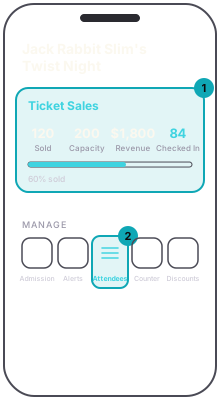
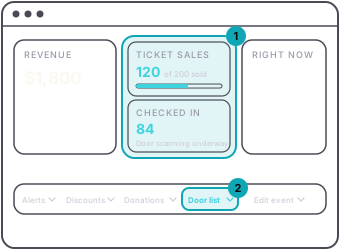
The event console shows the night's numbers and they update as the door scans. In the app, Ticket Sales shows Sold, Capacity, Revenue and Checked In. On the dashboard, Revenue has its own card, Ticket sales shows how many have sold out of your capacity, and Checked in sits below it. A team member's app shows the same counts without Revenue.
Attendees in the app is the list behind them, every ticket-holder and every guest pass with who is in. A group package shows as one row with how many of its people have arrived, and opens to show each one.
The Door list tab on the dashboard is the printable version: every ticket-holder and guest, with a Door column that reads IN once they are. It carries buyer emails, so it is behind your sign-in. It is a snapshot from when you open it, so anyone who buys after that is not on it.
Checked in counts admission tickets, scanned or checked in by name. Guest-list passes are not in it; Attendees and the Door list show who on the guest list is in. A ticket someone bought and never used stays in sold and never reaches checked in.