
Choose-a-price tiers
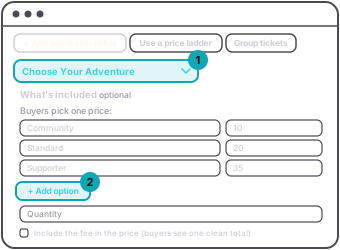
A choose-a-price tier offers a short list of prices and the buyer picks one. A supporter tier, a sliding scale, a "pay what you can" door, all of these are this. Up to six options, and each can have a label. The defaults are Community, Standard and Supporter.
It is made on the dashboard: press + Add admission ticket and pick Choose Your Adventure as its name, and the price list appears in place of the single price. Press + Add option for more. The app shows and sells it but does not create it.
It sits outside the ladder and stays on sale while the fixed-price tiers open in order. One per person: each buyer picks one option and can take one ticket, matched by their email.
For a free event where you want people to chip in rather than buy a ticket, use donations instead. It is a gift, not an admission, and it has its own code for the door.