
See what your ads sold
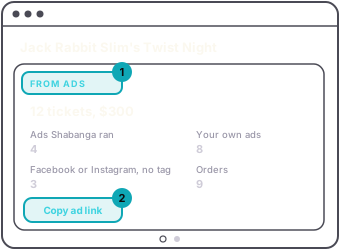
When someone buys from an ad link, the order remembers which ad brought them. On the event's own page, the dark Right now panel then has a second view, From ads.
At the top it shows the tickets your tagged ads sold and what they made you, with the fee out, the same way the Revenue card counts it. Under that, tickets are counted by where the buyer came from:
- Ads Shabanga ran, for a night we promote for you.
- Your own ads, from your ad link.
- Facebook or Instagram, no tag, for buyers who came from Meta on a plain link. These are not in the total at the top, because nothing says which ad they saw.
Orders is how many orders those ad tickets came in.
Copy ad link gives you this event's link with your tag on it. It sits beside the main button in the Right now panel on every published event, so it is there before any ad has sold, and From ads has the same button. Use it as the website link in your own Facebook or Instagram ads, so those sales count under Your own ads.
An ad can also link to your series page instead of one date. Put the same tag on the end of the series link: everything from the ? in your ad link. A buyer who picks a date from the series page is counted on that date, as long as they book in the same browser tab. Only dates in that series count it; anything else they buy in the tab is not counted as from your ad.
The panel turns between Right now and From ads on its own, except while doors are open, when it stays on Right now. The dots under it switch views at any time.
From ads appears with the first sale from an ad. A night with none shows Right now alone.