
"Tap to Pay is still starting up"
Once Tap to Pay is set up on a phone, its reader starts in the background when the app opens, and needs the internet to do it. Press the pay button (Tap to Pay on iPhone, or Tap to Pay on Android) while that is still happening and a line above the menu says what it is doing, such as Starting the reader… or Preparing Tap to Pay…, or that Tap to Pay is still starting up. Wait a moment and press again. The button itself never changes.
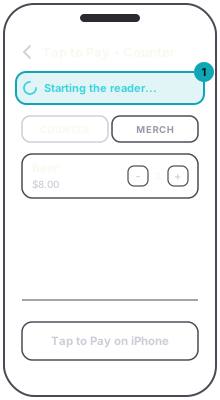
Now and then the phone installs an update for its reader first, which can take a few minutes. The line says Setting up Tap to Pay… this can take a few minutes., then shows a percentage.
If it keeps saying so, the phone is not getting online. Toggle wifi, or move to where the signal is, and the reader reconnects. Each tap needs a connection at the moment of the tap, and the reader disconnects whenever the phone loses signal or the app goes to the background, so the first sale after either takes a few seconds longer.
If the line says Location permission is required to take payments., the app was refused location. Turn it on for shabanga in the phone's Settings and open the till again.
On iPhone, if Apple's Terms and Conditions appear instead, Tap to Pay was never finished on this phone. Accept them and the till opens.